 notetime
Best Daily Journal Apps in 2026: 8 Picks Compared
Search "daily journal app" and the SERP looks the same as it did three years ago: Day One on top, a few brand pages, three listicles that mostly disagree and never explain why. Most of those listicles pick a winner and move on. The reader is the one who has to live with the choice for the next year of their life, and the choice is rarely about which app is "best." It is about which app's shape matches the writing you actually do.
The research on whether daily journaling helps is more settled than the app market lets on. A 2023 meta-analysis of 31 randomized trials found small but durable effects on depression, anxiety and stress that emerge at first follow-up and sustain over time (Guo, British Journal of Clinical Psychology, 2023). A 2025 systematic review reached similar conclusions for wellbeing and positive affect in non-clinical populations (Brown et al., PLOS One, 2025). The benefits exist. The hard part is showing up to write enough times for them to land.
I built notetime because I just wanted to know what I did and when I did it. Most note-taking apps I tried were trying to solve my entire life, which is something that cannot be done, at least not when your mind is too hectic for any system to keep up with. The thing I actually needed was much smaller: a single surface that timestamps every line and gets out of the way.
So this post is not "ten apps and they are all great." It is eight apps scored against the same seven criteria, with the cell where each one wins and the cell where each one loses named explicitly. I built the eighth one. I get to it last, scored on the same rubric.
Key Takeaways
- The right daily journal app depends on the shape of writing you actually do, not on which app is "best." End-of-day prose with photos? Day One wins. Many short timestamped lines across the day? notetime wins. Two-tap mood log with no typing? Daylio wins.
- Modern research (Guo, BJCP, 2023; Brown et al., PLOS One, 2025) confirms expressive-writing benefits emerge with delayed onset and require sustained engagement. Adherence beats feature richness.
- Apple Journal is now the default frictionless pick on iPhone (free, native, on-device suggestions, since iOS 17.2 and now macOS 26). It eliminates the "should I install something" question for most users.
- The hidden cost most listicles skip: 5-year cost of ownership. Day One Gold is around $375. Diarium is $9.99 one-time. Apple Journal is $0. notetime is $0.
- notetime is the only app in this list built around line-level timestamps and an append-only model. If you write many short entries throughout the day rather than one long entry per night, that shape changes which tool fits.
What to Look For in a Daily Journal App
Most "best daily journal app" listicles compare on the wrong axes. Feature counts, design polish, sticker libraries, AI screenshots. The right axes are the specific frictions that decide whether you will still be writing in the app in three months. Adherence beats feature richness, and the engagement-moderates-effects finding from a 2023 review in Frontiers in Psychology is direct: the effect size depends on how much you actually engage with the practice (Frontiers in Psychology, 2023).
The seven criteria
-
Time to first line. Open the app to first character typed. Under 5 seconds is good, under 10 acceptable, over 10 fatal. The expressive-writing literature is unambiguous that benefits come from sustained writing across days; the rate-limiting step is whether the first line gets written at all.
-
Free tier substance. Is the free tier usable for real daily journaling, or does it cap at 5 entries before pushing a subscription? "Free" in this category means very different things across vendors.
-
Cross-platform reach. iOS only, Android only, or both. Web access. Desktop sync. A daily journal app you can only use on one device fights the basic premise of "I want to write wherever I am."
-
Honesty mode (no-edit / append-only support). Does the app encourage editing past entries, or does its design preserve them. The honesty of the log is what makes it worth re-reading later. For the longer argument see append-only journaling, the methodology underneath this whole post.
-
Privacy and encryption. Is end-to-end encryption available, and is it on the free tier or only the paid one. Mental-health-adjacent writing raises sensitivity, and "we encrypt at rest" is not the same as "only the device holds the key."
-
AI feature quality and AI-fatigue resistance. AI prompts can help adherence (the Frontiers review's engagement framing applies here too). They can also become noise. The right question is whether the AI adds to the writing or substitutes for it.
-
Total cost of ownership over 5 years. Monthly, annual, or one-time. Tiered. Many "free" apps cost $400+ over five years; some "paid" apps cost $10 once. Show the math, do not bury it.
The rubric is binary or low / mid / high per cell, not a numeric score. Numeric scores look fake and invite challenge. The point is the consistency of applying these seven axes to all eight apps, including the one I built. Every app loses on at least one criterion. That is the credibility move. If a row is all highs, the rubric is broken or the post is.
For a deeper read on why time, specifically, is the right organizing axis for a journal at all, see why timestamps beat tags, the philosophy this scorecard sits on top of.
The Eight Apps
Eight apps, listed in decision-logic order rather than ranked preference order. Each gets a tight section: positioning, what it does well, where it falls short, who it is for, and a one-line scorecard at the end. The app I built is last, scored on the same rubric the other seven get.
1. Day One: best overall, the incumbent gorilla
Day One is the most polished daily journal app on the market, and it has been for a decade. It was acquired by Automattic in June 2021 (TechCrunch, 2021), and the polish budget shows. App Store ratings sit around 4.8 stars across more than 150,000 reviews.
Pricing has three tiers. Free covers a single device with one photo per entry, end-to-end encryption, and unlimited entries. Silver is $49.99/year and unlocks multi-device sync, 30 photos per entry, audio entries, and weather. Gold is $74.99/year and adds Daily Chat (AI conversational journaling), summaries, and image generation. Platforms: iOS, Android, macOS, Windows (launched 2025), web, watchOS.
The strength is real. E2EE on the free tier is rare here. The "On This Day" view works. Export options are robust (PDF, JSON, plain text), which matters because a journal app you cannot leave is not really yours.
The honest limitation is the model. Day One is built around the entry as the unit: one moment, one prose paragraph, sometimes a photo. That fits one shape (end-of-day prose) and fights another (many short timestamped lines across the day). Gold's AI tier is also a steep jump for marginal-to-novel value relative to the strong free-and-Silver baseline.
Time to first line: ~3s. Free tier: usable. Cross-platform: yes. Honesty: weak (free-form edit). Privacy: E2EE on free. AI: optional (Gold). 5yr TCO: $375 (Gold) / $250 (Silver) / $0 (free).
For a deeper head-to-head against the eighth app on this list, see notetime vs Day One, the deeper head-to-head.
2. Apple Journal: best free option (iPhone-only ecosystem)
Apple Journal is the default frictionless pick on iPhone, and it is plausibly the starting point for any iOS user asking the question this post answers. It shipped in iOS 17.2 in late 2023 as a Suggestions-driven app, then landed on iPadOS 26 and macOS 26 in 2025 (9to5Mac, 2025).
Pricing: free, no premium tier. Platforms: iOS (17.2+), iPadOS (26+), macOS (26+).
The wedge feature is on-device journaling suggestions: prompts surfaced from your photos, locations, workouts, and recent activity, all processed locally. It is the first journaling app I have used where the prompt felt like it knew what kind of day I had had. Search, mood logging, and an insights pane have shipped in later iOS updates.
The strength is the absence of a decision. The app is already on the phone. No install, no signup, no payment screen. For a first-time digital journaler asking "where do I start," that is the right answer in 2026 most of the time.
The honest limitation is the lock-in. There is no Android version, no web app, no Windows version. There is also no end-to-end encryption at the journal-app layer; users who want E2EE specifically need Advanced Data Protection enabled at the iCloud level.
Time to first line: ~2s. Free tier: full app. Cross-platform: Apple-only. Honesty: weak. Privacy: standard iCloud (E2EE only with ADP). AI: on-device suggestions. 5yr TCO: $0.
3. Journey: best cross-platform
Journey is the most platform-agnostic daily journal app on this list. If you write across iPhone, an Android tablet, a Mac, a Windows desktop, and a Chromebook, Journey is the only app here that runs natively on all of them.
Pricing has a free tier with local-only basics. Membership is $6.99/month or $49.99/year. A Lifetime license is $199, rare in this category and the cheapest path if you intend to journal for more than four years. Platforms: iOS, Android, macOS, Windows, web, ChromeOS.
The strength is the platform reach. The Lifetime tier is the move that signals confidence in the product; most apps in this space want recurring revenue.
The honest limitation is the surface area. Journey's UX is busier than Day One's. The "Odyssey" AI on paid tiers feels like a category bet (every journal app must have AI now) rather than something the writing needs.
Time to first line: ~5s. Free tier: usable but limited. Cross-platform: best in class. Honesty: weak. Privacy: standard, E2EE on paid. AI: paid (Odyssey). 5yr TCO: $199 (Lifetime) / $250 (annual) / $0 (free).
4. Diarium: best one-time-purchase
Diarium is the answer for users who refuse to subscribe to a journal. The app uses a buy-once-own-forever model, which is rare enough in this category that it is the entire reason to consider Diarium first.
Pricing: Pro is $4.99 one-time on iOS or Android, $9.99 one-time on Mac or Windows. Pricing is per platform. Platforms: Windows, macOS, iOS, Android. The app won a Microsoft Store Award in 2024.
The strength is the pricing model and the Windows fit. Day One only landed on Windows in 2025; Diarium has been the polished choice for journaling on a PC for years. E2EE is available, and sync uses your own cloud (Dropbox, OneDrive, Google Drive) rather than vendor lock-in.
The honest limitation is two-part. Pricing is per-platform, so a user who wants iOS and Mac pays $4.99 + $9.99 rather than one combined fee. And the UX is unmistakably "indie utility" rather than "designed app." A chunk of Diarium's audience explicitly prefers it.
Time to first line: ~5s. Free tier: trial only. Cross-platform: Win/Mac/iOS/Android. Honesty: weak. Privacy: E2EE optional, BYO-cloud. AI: minimal. 5yr TCO: $10 to $20 (one-time).
5. Daylio: best for mood-first / tap-based journaling
Daylio is the answer for people who do not want to write but want a record. The core interaction is two taps: pick a mood, pick an activity, done. A year of taps becomes mood charts and correlations, which is a different deliverable than a year of written entries, but a real one.
Pricing has a robust free tier (moods, activities, custom moods). Premium is $4.99/month or $35.99/year, unlocking unlimited custom moods, advanced stats, and exports. Platforms: iOS, Android. The vendor reports approximately 20 million users since 2015 (a vendor claim, cited here at face value).
The strength is the absence of typing. For users who hesitate at "what should I write," tap-based logging removes the blank-page problem entirely.
The honest limitation is that Daylio is not a writing journal. The thing it captures is mood, not thought. If you want to come back in five years and read what you were thinking on a particular day, Daylio's record is too thin. If you want to come back and see whether you were happier in November than in February, Daylio is the right tool.
Time to first line: ~2s (tap, not type). Free tier: robust. Cross-platform: iOS, Android. Honesty: high (the record is the tap). Privacy: standard. AI: minimal. 5yr TCO: ~$180 (Premium) / $0 (free).
6. Stoic: best for guided / structured practice
Stoic is the answer for users who bounce off blank pages. The app removes the "what do I write about" decision with a guided morning practice and a guided evening practice, framed in Stoic philosophy (Marcus Aurelius, Seneca, Epictetus, the usual cast).
Pricing has a limited free tier and a Premium tier at $6.99/month or $59.99/year that unlocks the full prompt library and AI pattern analysis. Platforms: iOS, Android, macOS, web, watchOS.
The strength is the structure. The framing is opinionated in a useful way: "this morning, name one thing in your control today, and one thing not in your control." That kind of prompt is the difference between zero entries and one entry on hard days.
The honest limitation is also the framing. The Stoic philosophy aesthetic feels performative to some users (mountain quotes, marble busts, the lot), and the prompts can land as instruction rather than invitation if you are not in the mood. The opinionated framing is the value if you want a practice; it is the friction if you want a blank page.
Time to first line: ~5s (prompt is the surface). Free tier: limited. Cross-platform: iOS/Android/Mac/web/watchOS. Honesty: medium. Privacy: standard. AI: paid. 5yr TCO: ~$300 (Premium) / $0 (free).
7. Rosebud: best AI-conversational
Rosebud is the answer for users who want the AI to be the practice. Unlike Stoic, where the AI is an addition, Rosebud is built around an AI that responds to what you write, asks follow-ups, and gives back a shape that resembles a coaching conversation. The startup raised a $6 million seed round in June 2025 (TechCrunch, 2025).
Pricing: Bloom plan at $12.99/month or $155.99/year, the high end of the category, with no entry-level tier. Platforms: iOS, Android, web. Voice support spans roughly 20 languages.
The strength is the conversation quality and the voice mode. Rosebud's AI engages with what you actually wrote, in a way that feels like reading the entry rather than pattern-matching a template. For users who would not journal otherwise, Rosebud often turns into a practice that sticks where blank-page apps did not.
The honest limitation is two-part, and serious. First, $155.99/year is the most expensive on this list, which deserves its own evaluation about whether the AI is worth more than four years of Day One Gold. Second, if the assistant becomes the relationship with your own thoughts, the journal is less yours. That is not a bug for everyone; for some users it is the entire reason a journal is a journal.
Time to first line: ~3s. Free tier: very limited. Cross-platform: iOS/Android/web. Honesty: low (AI reshapes reflection). Privacy: cloud-required. AI: central. 5yr TCO: ~$780.
8. notetime: best for timestamped, append-only daily logs
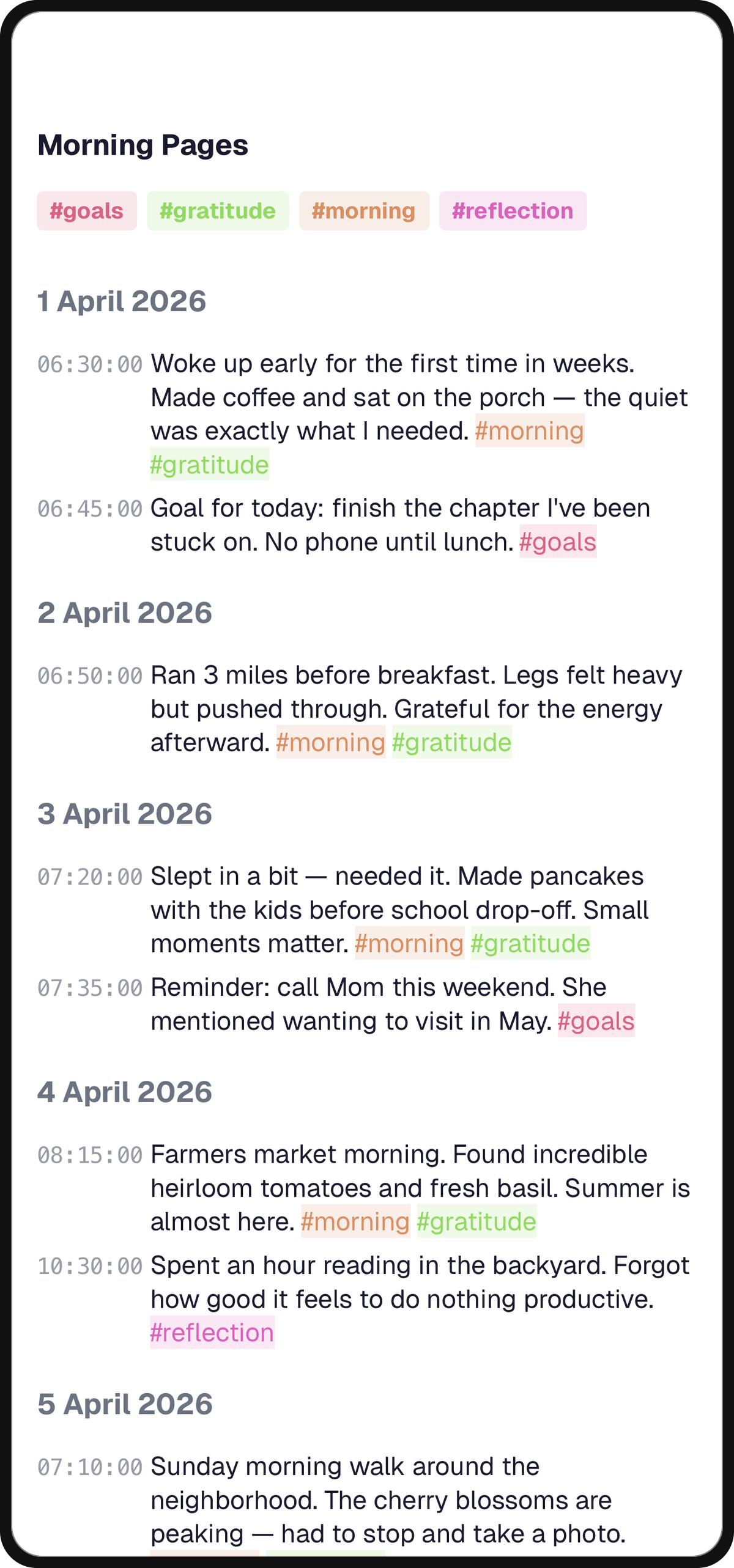
notetime is the app I built. It is not, strictly, a journal app. It is a single timestamped notes surface where every line you type gets auto-stamped the moment you start typing, the document is one continuous diary rather than a folder of entries, and there is no "create new entry" step. The shape that fits is many short entries across the day, not one prose entry at night.
Pricing: free, no signup, offline. A single in-app purchase exists for cross-device sync ("Pro"). Platforms: iOS (App Store), web (notetimeapp.com). macOS is in progress.
The strength is the friction profile. There is no "create entry" step because there is no entry; you open the app and start typing, and the line is the record. Line-level timestamps are first-class, unusual in this category (every other app on this list times the entry, not the line). The append-only norm comes naturally from the design. For users for whom the question of the journal is "when did this happen," that shape is materially different from "what did I think about today." For the practice that sits on top of this design, see the two-week note review ritual, the practice that keeps the log honest.
The honest limitation is the scope. No mood log, no AI, no media attachments, no prompt library. If your journaling is one paragraph at 10pm with a photo, this is the wrong app and Day One or Apple Journal is the right one. The cell where it loses on this rubric is media support and AI-assisted reflection, both deliberate.
Time to first line: ~2s. Free tier: full core feature. Cross-platform: iOS, web (Mac in progress). Honesty: high (append-only by default). Privacy: high (offline-first, device-level). AI: none. 5yr TCO: $0 (free) or one-time Pro purchase.
Comparison Matrix
The matrix is the at-a-glance view. The per-app sections above are where the nuance lives. If you are skimming, scan for the row that is mostly highs on the criteria you care most about. If you are torn between two apps, read those two sections in full; the matrix is too compressed to make a final decision from. The 5-year TCO column is the one most listicles skip and the one that ends up mattering most over time.
| App | Free tier | 5yr TCO | Platforms | Best for | Honesty mode |
|---|---|---|---|---|---|
| Day One | 1 device, E2EE | $0 / $250 / $375 | iOS, Android, Mac, Win, web, watchOS | End-of-day prose with photos | weak (free-form edit) |
| Apple Journal | full app | $0 | iOS, iPadOS, macOS | iPhone users wanting zero install friction | weak |
| Journey | local + limited sync | $199 (lifetime) / $250 | iOS, Android, Mac, Win, web, ChromeOS | Cross-platform writers | weak |
| Diarium | trial only | $10 to $20 (one-time) | Win, Mac, iOS, Android | Subscription-averse, Windows-first | weak |
| Daylio | robust | $0 / ~$180 | iOS, Android | Mood tracking without typing | high (tap is the record) |
| Stoic | limited | $0 / ~$300 | iOS, Android, Mac, web, watchOS | Guided practice, prompt-driven | medium |
| Rosebud | very limited | ~$780 | iOS, Android, web | AI-conversational reflection | low (AI reshapes reflection) |
| notetime | full core feature | $0 (or one-time Pro) | iOS, web (Mac in progress) | Many short timestamped lines across the day | high (append-only) |
No row is all highs. That is on purpose. Every app in this matrix loses to at least one other app on at least one criterion that matters to some reader. The right app is the one whose row matches your particular writing shape, not the one with the most highs overall.
Which App Should You Pick?
Seven scenarios, each pointing at the app whose shape fits. Read the one that matches you and skip the rest.
You write one prose entry per day with a photo or two. Day One. Apple Journal if you want free and you are iOS-only.
You journal across iPhone, Mac, and the web. Journey. The Lifetime tier at $199 is the cheapest path if you commit for more than four years.
You hate subscriptions. Diarium. $9.99 to $20 once, depending on platforms, and you own it.
You want to track mood without typing. Daylio. Two taps, done; come back in a year for the chart.
You want guided prompts and never know what to write. Stoic, if you like the philosophy framing. Rosebud, if you want AI conversation specifically rather than fixed prompts.
You want maximal AI engagement with your writing. Rosebud. Eyes-open about the price and the dependency; if the AI is the relationship with your thoughts, the journal is less yours, and that may or may not be a trade you want.
You write many short entries throughout the day, with timestamps as the structure. notetime. This is the shape Day One fights and Apple Journal does not handle natively, and it is the only place I would steer the reader toward the app I built rather than one of the others. If those short entries are trades specifically, the trading journal app comparison walks the same decision with trading-specific criteria.
The honesty here is the point of the rubric. Saying "Day One wins" or "Daylio wins" inside a post on this blog is what makes the rest believable. If the comparison piece you are reading has the author's product winning every category, the post is a sales page in comparison clothing.
Frequently Asked Questions
What is the best daily journal app overall?
It depends on your writing shape. For most people on iPhone, Apple Journal is the starting point because there is zero install friction and the on-device suggestions are good. For polish, cross-platform reach, and AI features, Day One Gold is the conventional answer. For many short timestamped entries throughout the day, the eighth app on this list fits a shape the other seven do not. The "best" is the one whose shape matches yours, scored against the rubric earlier in this post.
Is Day One still worth it in 2026?
Yes for users who write end-of-day prose with photos. The polish, the export options, and the end-to-end encryption on the free tier are all real. It is less compelling now that Apple Journal is free and capable for iOS-only users; the value of Day One specifically is the cross-platform reach (including the new Windows app), the Gold AI tier if you use it, and the trust of 150,000+ App Store reviews.
Is there a free daily journal app?
Yes, several. Apple Journal is fully free on iOS, iPadOS, and macOS. Daylio's free tier is robust enough for daily mood-and-activity logging. Day One's free tier is single-device but otherwise unrestricted. The eighth app on this list is free with no signup for the core feature. The free options exist; the question is which free tier's shape matches yours.
Should I use a notes app or a dedicated journal app?
If your writing is one paragraph per day with a photo, a dedicated journal app fits cleanly. If your writing is many short entries throughout the day where the timestamp is part of the content rather than metadata, a timestamped notes app fits and a dedicated journal app fights you. The shape question is the right one to ask first. For the deeper version of that argument, see the sister listicle for ADHD-specific journaling, which goes through the same seven-criterion rubric for a different reader.
Does daily journaling actually help?
The literature is on the side of yes, with caveats. The 2023 meta-analysis of 31 randomized trials found small but durable effects on depression, anxiety, and stress that emerge at first follow-up and sustain (Guo, BJCP, 2023). A 2023 Nursing Open systematic review covering expressive and positive writing across populations reached compatible conclusions (Lai et al., Nursing Open, 2023). Brown et al. (2025) found wellbeing and positive affect benefits most consistent in non-clinical populations (Brown et al., PLOS One, 2025). Effects depend on engagement; writing twice and quitting does not work.
How long should daily journal entries be?
Pennebaker's original protocol called for 15 to 20 minutes for 3 to 4 consecutive days. For ongoing daily use, the literature does not prescribe a length; in practice, 2 to 3 short entries per day is more sustainable than one long one for most people. The unit is one thought, not one paragraph. Adherence beats length.
The Short Version
There is no single best daily journal app. The right one is the one whose shape matches the writing you actually do, scored against the seven criteria above. Eight apps, eight scorecards, one matrix, one decision. The point of the rubric is that you should be able to find your row in the matrix and stop reading.
If your row is the one about many short timestamped entries throughout the day, notetime is free at notetimeapp.com and the rest of this comparison is the context for why I built it that way.
Tip
notetime is iOS and web today, with macOS in progress. It is free for the core feature, no signup, offline-first, and every line you write is auto-timestamped. If your writing is many short entries across the day and the when matters as much as the what, it is worth ten minutes. If your writing is one paragraph at 10pm with a photo, Day One or Apple Journal is the right answer; the rubric in this post is the same either way.