 notetime
Andrej Karpathy's Note-Taking Method (Append and Review)
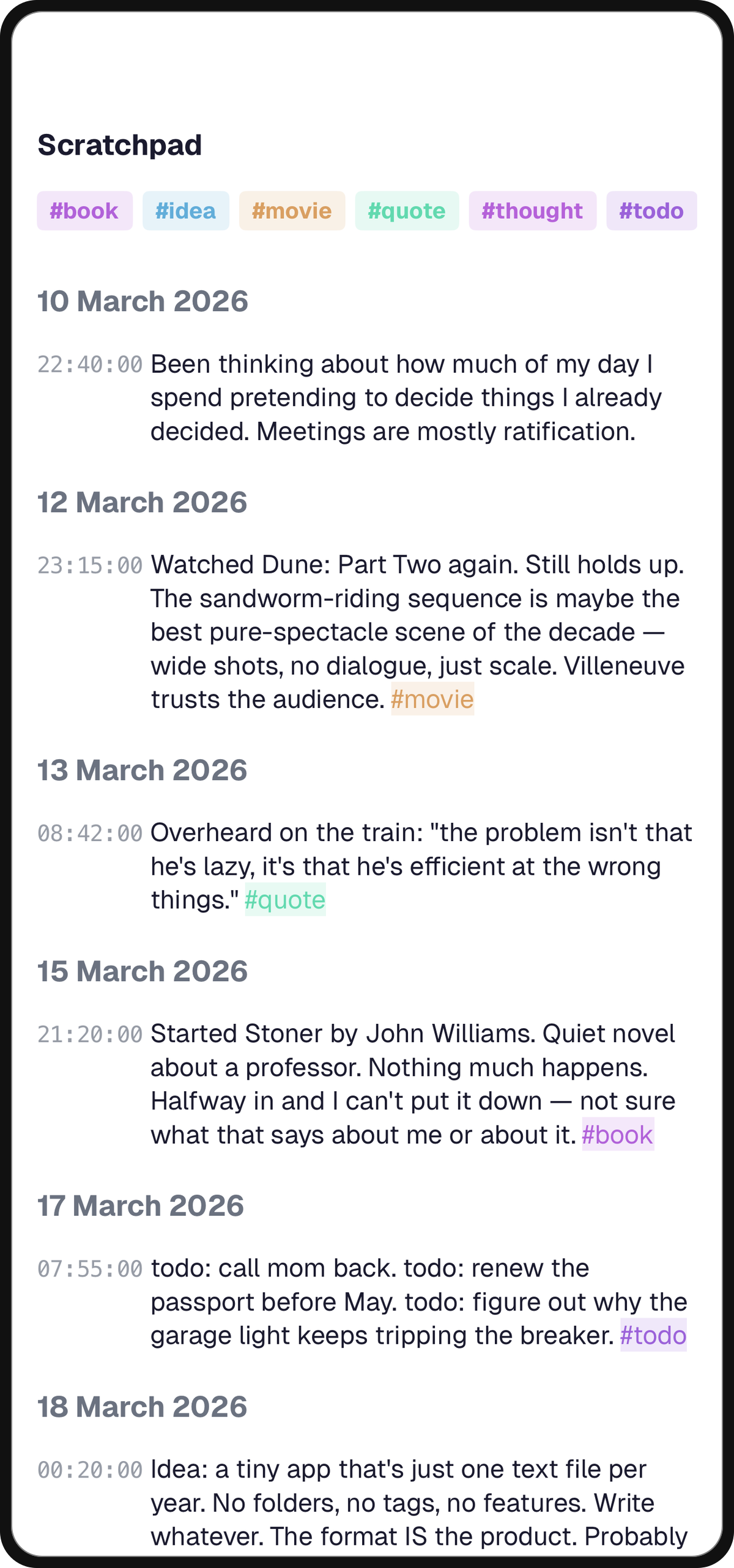
In March 2025, Andrej Karpathy posted on X about the note-taking system he had been quietly using for years. He calls it the append-and-review note. One single text note in Apple Notes, named "notes." Anything that comes to mind gets appended to the top. Every once in a while he scrolls down through the older stuff and rescues anything that still deserves attention by copy-pasting it back up. Things that don't get rescued sink, slowly, "almost as if under gravity."
What's striking about reading it, if you've used notetime for a while, is how exactly the two systems describe the same thing. The mechanic Karpathy built by hand in a generic notes app is the mechanic notetime is built around natively. The structure has a name in the cluster of posts that follow this one: append-only journaling. This article walks through the overlap, the tag question (where the two diverge most), and the one rescue step notetime intentionally drops.
Key Takeaways
- Karpathy's method has three rules: one note, append to the top, review by scrolling and rescue anything still worth attention. He uses Apple Notes and Ctrl+F to make it work.
- notetime maps the same three rules natively. The diary is the one note. Auto-timestamps replace manual top-positioning. The review is the scroll, with no manual rescue step.
- The tag handling is where the two diverge most. Karpathy uses
watch:andread:as a Ctrl+F trick. notetime turns the same idea into tap-to-filter pills with cross-diary scope and chronological context preserved.- The cognitive-science case: episodic memory retrieves along a temporal axis (Folkerts et al., J Neurosci, 2018), so a chronological log matches recall better than a category-first system.
- If you're already running Karpathy's system in Apple Notes, the migration to notetime is mostly subtraction. The structure you'd resist by hand is just how the app works.
What Is Andrej Karpathy's Note-Taking Method?
Karpathy's note-taking method is one append-only Apple Notes file named "notes," with new entries pasted at the top and old ones reviewed by scrolling. The method has three rules, no folders, no schema, and an estimated decade-plus of personal use behind it (@karpathy, 2025). The structure is deliberately minimal.
One Note, Not a Tree
Karpathy keeps a single text note. No folders, no sub-notes, no tagging system, no graph view. He gives a specific reason: "Maintaining more than one note and managing and sorting them into folders and recursive substructures costs way too much cognitive bloat. A single note means CTRL+F is simple and trivial."
This is the part most note-taking advice gets wrong. The internet is full of Notion and Obsidian setups that try to solve "where do I put this thought" by adding more places to put it. Karpathy's answer is to delete the question.
Append to the Top, Without Metadata
Anything that comes to mind gets pasted at the top. No date, no project tag, no concept link. The exception is a tiny set of inline tags he uses for things he wants to revisit by category. watch: for movies, listen: for podcasts, read: for books. The reason is functional: those prefixes make Ctrl+F faster on a long page.
That's the whole capture loop. Idea arrives, gets typed at the top, you move on. He's explicit about why. "When I note something down, I feel that I can immediately move on, wipe my working memory, and focus fully on something else." The no-metadata posture isn't aesthetic. For the principled case for time as the organizing axis, the timestamp is the only piece of metadata that pays for itself, and Karpathy's setup approximates the same conclusion by hand.
Review by Drift, Promote by Hand
Time does most of the sorting. New stuff lands on top, so older entries slide down the page. Periodically he scrolls through the bottom and skims. Anything that still deserves attention gets copy-pasted to the top again. Anything that no longer matters stays where it is and keeps sinking.
Notes that genuinely fade away are not deleted. They just stop being on top. Notes that keep mattering keep getting rescued, and over years they end up being the things you've actually thought about most. For the canonical version of this practice on a fixed cadence, see the two-week note review ritual.
Where Does notetime Map One-to-One?
A notetime "diary" is, structurally, exactly the Karpathy note. One linear surface, infinite append, full-text search across everything. The same three rules show up, but a couple of them are no longer rules. They're the default. The cognitive-science reason a chronological log retrieves better than a category-first one comes from temporal-context research: successful recall is accompanied by a measurable jump back in time at the neural level (Folkerts, Rutishauser, Howard, J Neurosci, 2018).
One Diary Replaces "One Note"
The unit of organization in notetime is the diary, and most users have just a few. Work, personal, a project log. Each one is a single append-only stream. There are no folders, no sub-pages, no nested anything. If you wanted to run Karpathy's setup literally, you'd open one diary called "notes" and never make another, and the app would behave correctly.
The cognitive bloat Karpathy describes (folders, tags, structure, recursive substructures) isn't something you have to resist in notetime. It isn't there. The path of least resistance is already the system he's recommending. For a side-by-side of how Apple Notes feels once you stop fighting it, see notetime vs Apple Notes.
The Timestamp Replaces "Append to the Top"
This is the part that maps the cleanest, with the smallest difference.
In Karpathy's setup, you manually type new things at the top so they're easy to find later. The position on the page is the proxy for when did I write this. New things are at the top because they were written most recently.
notetime makes that proxy explicit. Every line you write is auto-tagged with the exact time it was written. You don't manually decide where new things go. The timestamp is there from the moment you start typing, and the order is chronological by definition. The "no metadata" rule Karpathy enforces by hand becomes a thing you can't violate even if you tried.
The one inversion: notetime puts the newest entry at the bottom, like a chat or a paper journal, not the top. The direction is reversed but the property is identical. Newest is closest to "now," oldest is furthest, and time is the only sort key.
Tags: From Ctrl+F Hack to First-Class Filter
This is the biggest single difference between Karpathy's setup and notetime. Karpathy uses tags as a plain-text search trick: type watch: in front of a line, then later do Ctrl+F for watch: and read whatever surfaces. It works for one person on one note for a few thousand entries. It also leans on a 1980s affordance (in-page text search) that hasn't really moved since. notetime takes the same idea, the inline tag, and turns it into a structurally first-class filter without changing what you do at capture time.
Tap to Filter, Not Ctrl+F
In notetime, every #tag you write becomes a tappable pill. One tap on a #sleep pill filters the entire diary down to lines that contain #sleep. No keyboard shortcut. No "find next." No reading every match in turn and pressing Enter to step through. The tag itself is the filter affordance, surfaced inline where you wrote it. The cognitive load of "I need to remember which prefix I used" goes away because the tags are in front of you as colored pills, not hidden inside prose you have to search.
Cross-Diary, Not Single-Note
Karpathy's Ctrl+F works because everything is in one note. The moment you have two notes, the trick breaks. notetime's tag filter works across every diary you have. Type #sleep in your personal diary on Tuesday and #sleep in your work diary on Friday, and the tag filter in either place pulls both. The homepage explanation puts it concisely: lines are tagged individually, so you can filter across every note you've ever written.
Soft Filtering Preserves Chronology
When you tap a tag in notetime, non-matching lines don't disappear. They dim to about 20% opacity. You still see when the matched lines happened in the surrounding flow. This matters more than it sounds. Episodic recall depends on temporal context (Sederberg, Miller, Howard, Kahana, Memory & Cognition, 2010); a filter that erases the surrounding entries strips the very context the brain uses to retrieve. Ctrl+F destroys that context every time. The match is the only thing on screen, and "when did this happen relative to everything else" becomes guesswork.
Tag Counts and Color Recognition
The global tag provider in notetime exposes every tag you've used along with how often you've used it. You can see at a glance that you've written about #sleep 47 times this year and #deadline 12. Karpathy's plain-text setup has no equivalent; you'd have to Ctrl+F each prefix and count manually. Tags are also color-coded by name hash, so the same tag is always the same color across the app. Visual recognition is instant. In a plain-text note, every watch: looks identical to every other one and you parse them by reading; in notetime, your eye finds the orange #watch pills before you finish scrolling.
Inline Stays Inline
The capture-time affordance is the same as Karpathy's prefix trick. You type #tag mid-sentence. No modal, no sidebar, no mode switch, no taxonomy to maintain. The structure you get back at retrieval time is what changed, not what you do at write time. That's the design bet: keep the simplicity Karpathy's method earns at capture, and add the leverage at retrieval that Apple Notes doesn't give you. For a tighter argument about why time, not category, is still the load-bearing axis even when tags are this good, see why timestamps beat tags as the organizing axis.
Where notetime Goes One Step Different
There's one place the systems honestly diverge, and it's the part of Karpathy's post that is the most manual: the rescue.
In his setup, the way an old idea earns another round of attention is that you scroll down, find it, and copy-paste it back to the top. The act of re-typing or re-pasting is the promotion. Without that manual step, the idea keeps sinking and eventually drifts out of mind.
notetime doesn't have a rescue step, and on purpose. The review is the scroll. You scrub backwards through the timestamped log and read what you wrote three weeks ago, six months ago, last year. If something still matters, you don't have to copy-paste it forward. You just write a new line about it now, at the current timestamp, and it joins the top of the log on its own. The old entry stays where it is, in its real chronological place, and the new entry preserves the fact that you came back to this thought on this date. Over time, the diary records not just what you thought but when you thought it, and how often you returned.
There's a learning-science angle here too. Spaced retrieval, where you re-encounter material at intervals rather than restudy it on demand, is among the most replicated effects in memory research (Roediger & Karpicke, Psychological Science, 2006). The scroll-back-through-the-log review is closer to retrieval practice than the rescue is; you read the old entry again, and the act of reading it now is what earns it another round of memory. The rescue step in Karpathy's version is doing some of the same work, but as restudy by relocation rather than retrieval in place.
The trade-off is honest. Karpathy's version keeps the most-thought-about ideas physically near the top of the page, which is great for at-a-glance recall. notetime trades that for an unbroken chronological record, which is better when you care about when something happened or want to reconstruct the timeline later. For a trader logging the tape, an engineer debugging an incident, or anyone keeping a daily journal, the timeline usually wins.
Frequently Asked Questions
What is Andrej Karpathy's note-taking method?
It's a single append-only note in Apple Notes named "notes." New thoughts get pasted at the top, no date or category attached. Periodically he scrolls down to the older entries and copy-pastes anything still worth attention back to the top. Things that don't get rescued keep sinking. He calls it the append-and-review note (@karpathy, 2025).
How does Karpathy organize his notes?
He doesn't, beyond top-of-page recency. There are no folders, no sub-notes, no nested structure. New ideas go to the top of one continuous note, and time does the sorting. He's explicit that managing multiple notes and folders costs "way too much cognitive bloat," and that one note keeps Ctrl+F simple. The position on the page is the only metadata he relies on.
Does Karpathy use tags or folders?
No folders. The only tags are inline plain-text prefixes like watch:, listen:, and read: for things he wants to revisit by category. They aren't a tagging system. They're search anchors that make Ctrl+F faster on a long note. notetime takes the same inline-tag idea and turns it into tap-to-filter pills with cross-diary scope and usage counts.
What note-taking app does Karpathy use?
Apple Notes. He keeps one note named "notes" inside it, and the entire system runs on copy, paste, scroll, and Ctrl+F. He's said the choice is partly that the app "fades into the background" and partly that one plain-text surface is harder to over-engineer than any structured tool. For a comparison of running an append-only practice in Apple Notes versus a timestamped tool, see notetime vs Apple Notes.
Why does Karpathy keep all his notes in one file?
Because the alternative is worse. His phrase is "cognitive bloat": the moment you have a folder, you have to decide where new things go, and that decision tax is paid every single capture. One file means the answer is always the same place, and capture cost falls to one keystroke and a thought. The cognitive-science version of this argument is in append-only journaling.
How is notetime different from Karpathy's Apple Notes setup?
Three things. Every line is auto-timestamped, so you never have to position by hand. Tags are tap-to-filter pills with usage counts and cross-diary scope, not a Ctrl+F trick. There is no manual rescue step; the review is the scroll, and a re-read is logged as a new line at today's timestamp. The capture-time affordance is the same. The retrieval-time affordance is structurally different.
Tip
Karpathy ends his post with "One text note ftw." That's the whole thesis: a single, append-only, full-text-searchable surface beats almost any system you'd design on purpose. notetime's bet is that adding the timestamp, the tappable tag, and the dim-don't-erase filter turns it into a log you'll actually read back.