 notetime
How to Keep a Trading Journal in a Notes App
Most retail traders know they should keep a journal. Most don't. ESMA's required risk disclosures put the stakes plainly: 74-89% of retail CFD accounts lose money, with average per-client losses ranging from €1,600 to €29,000 (ESMA, 2018). A study of nearly half a million Taiwanese day traders found that fewer than 1% reliably earn positive returns net of fees (Barber, Lee, Liu, Odean, 2014). Whatever the rest of them are doing, doing it without a written record is part of the problem.
The gap between intention and habit usually comes down to friction. Dedicated trading-journal software is either too rigid, too expensive, or simply another app to context-switch into. A notes app sidesteps all of that. You already have it open. Your trade log lives next to your research, your watchlists, and your earnings call notes. For the head-on comparison of dedicated trading-journal SaaS (Tradervue, Edgewonk, TradesViz, TraderSync, Chartlog) against the spreadsheet baseline and notetime, see the best trading journal app comparison.
This article walks through how to structure a trading journal inside a notes app so it's actually useful: not just a tape of fills, but a feedback loop that improves your decisions over time.
Key Takeaways
- 74-89% of retail CFD accounts lose money (ESMA, 2018); a written record is what lets you learn from the losses.
- Capture the why before the P&L: setup, expectation, falsification, then outcome.
- Review weekly in clusters of 10-20 entries; patterns never show up in a single trade.
- A timestamped notes app like notetime replaces a spreadsheet without the column drag.
Why Most Trading Journals Fail Before Week Three
Brett Steenbarger, the trading psychologist who has coached prop-shop and hedge-fund traders for over two decades, draws a sharp distinction: a journal as a reporting tool isn't a performance-building tool (TraderFeed, 2019). The first records what happened. Only the second changes what happens next.
What kills most journals is that they collapse into the first kind. You write the fill, you write the size, you write the P&L, and three weeks later the entries are interchangeable. There is nothing in there that would let a stranger, or a future you, reconstruct why you took the trade.
The fix isn't more discipline. It's lower friction at the moment the thought matters. If capturing a thesis takes ninety seconds and three taps, you'll skip it before the open. If it takes typing two lines into a note that's already on your screen, you'll do it.
What to Capture After Every Trade
The most common mistake is logging what happened rather than why you acted. Memory makes it worse. Classical research on the Ebbinghaus forgetting curve, replicated in 2015, found that roughly 70% of newly learned material is gone within 24 hours unless deliberately rehearsed (Murre and Dros, PLOS ONE 2015). By Tuesday morning you literally cannot remember what Monday's thesis was.
A useful entry answers four questions, and three of them are worth answering before you check P&L:
- What was the setup? One line. "ORB long after VWAP reclaim." If you can't say it in a phrase, it isn't a setup yet.
- What did you expect to happen? A target, a stop, a time horizon. Anything specific enough that you'll later recognize whether it played out.
- What would have to be true for you to be wrong? Falsification. The price level, the tape signal, or the news event that would invalidate the thesis.
- What actually happened, and does it match or contradict the thesis? Added after the trade closes.
Keep the entries short. Long paragraphs encourage narrative rationalization, the kind of writing where you talk yourself into believing a losing trade was just bad luck. Bullet points and timestamps are harder to spin.
Tag the Setup Type, Not Every Field
You don't need a column for everything. A handful of inline tags, dropped into the prose, do most of the work:
#breakoutfor opening-range and base-on-base setups#meanreversionfor fades and gap-fills#earningsfor post-print plays#thesis,#entry,#stop,#exit,#lesson,#win,#loss
Two months later, you can filter for #breakout #loss and read every breakout you got stopped on. That's the entire pattern-finding workflow. No spreadsheet pivot table required.
How notetime Works as a Trading Log
A notes app fails as a trading log the moment you start manually typing dates and times in front of every entry. notetime removes that step. Each line is auto-tagged with the timestamp it was written, so the log is chronological by definition and every entry is locked to when you actually had the thought, not when you got around to writing it down. The shape this produces is append-only journaling, applied to trading.
That timestamp matters more than it sounds. Trade post-mortems have a way of drifting toward what feels true now rather than what was true at 9:47 AM. A timestamp anchors the entry: this is what you wrote, before you knew how it ended. The 2:00 PM "I knew this would happen" is contradicted by your own 9:47 AM line on the same screen.
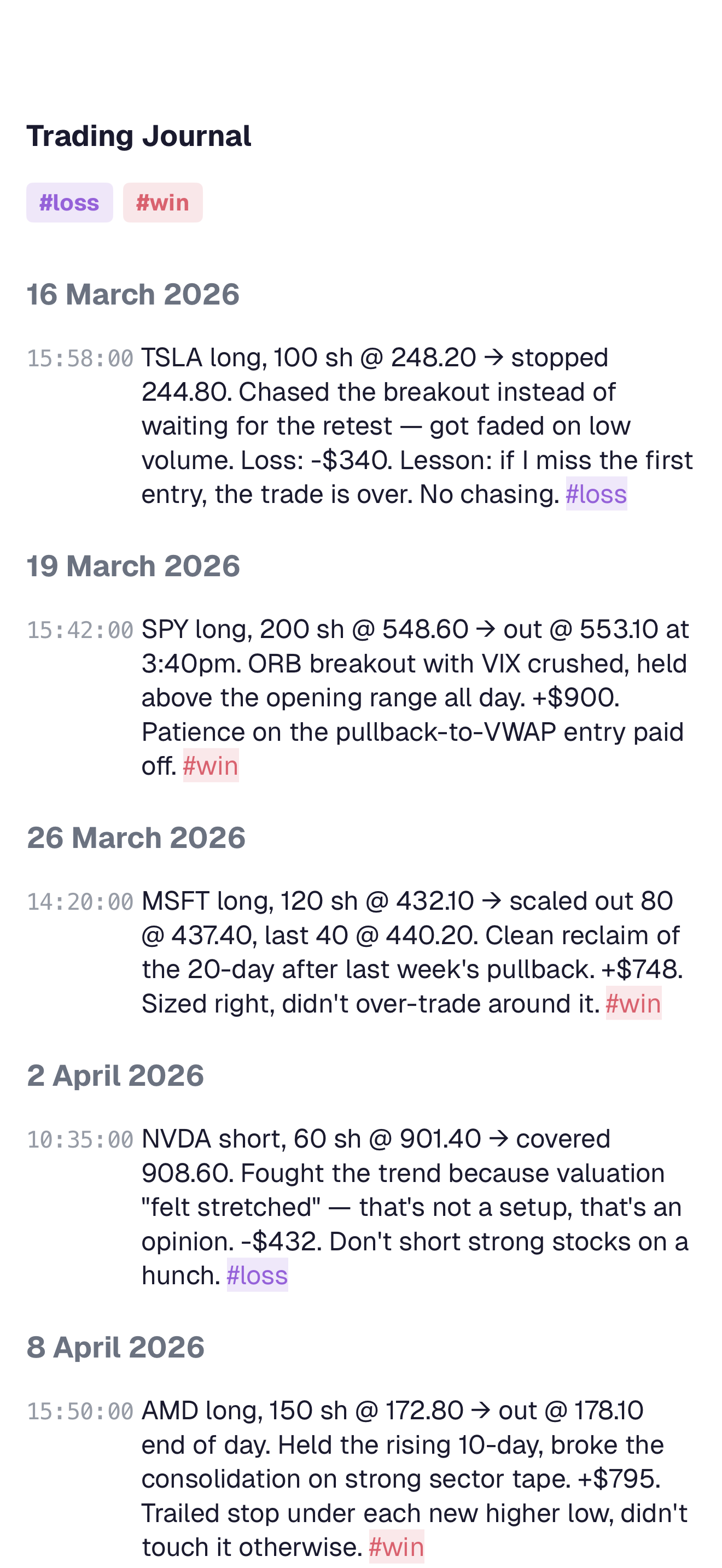
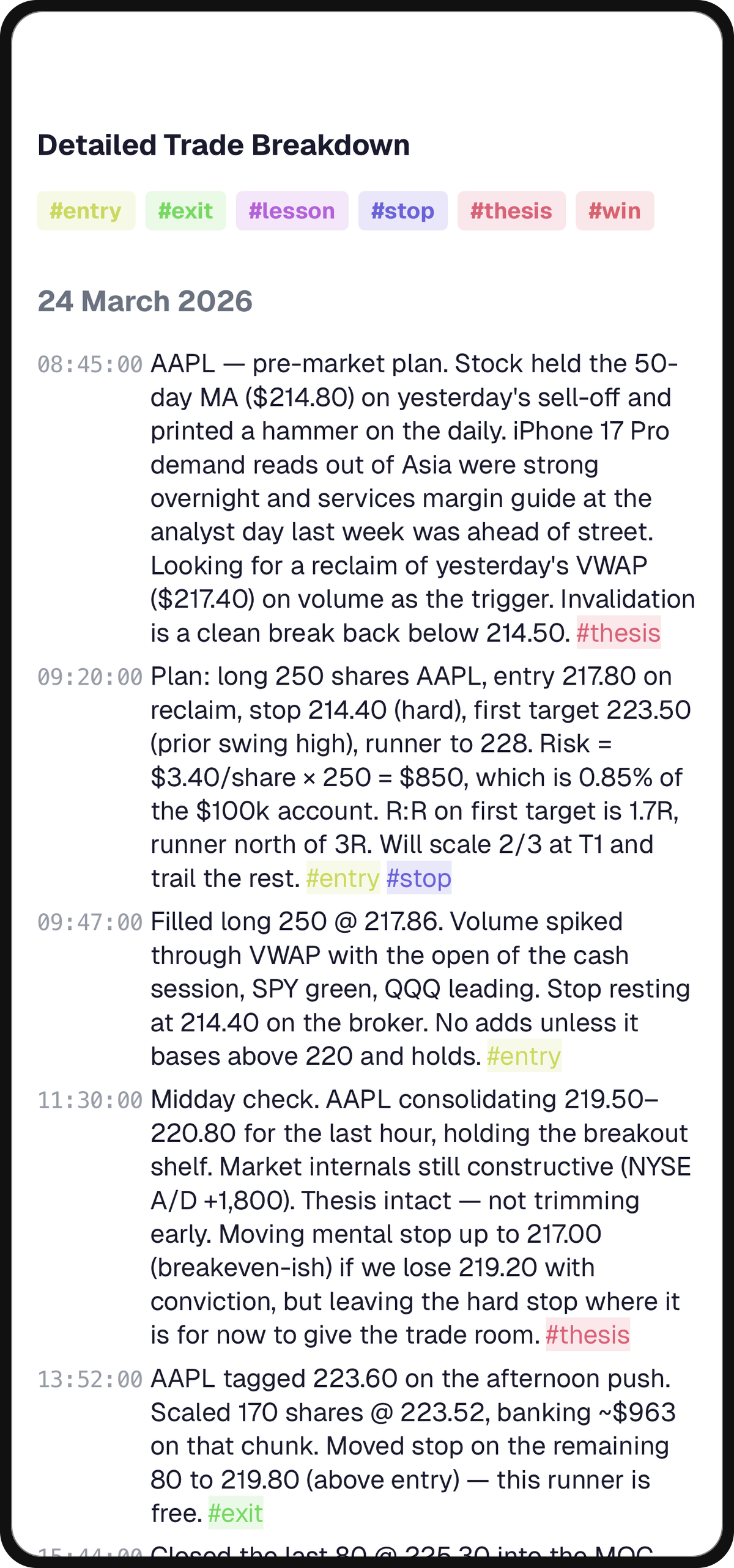
The same diary holds intraday detail and multi-week pattern. You can scroll into a single morning and read the pre-market plan, the entry, the midday check, and the trail stop on consecutive timestamped lines. Then you can scroll out to a month and skim a thirty-line ledger of #win and #loss tags. The same surface does both jobs, which is the part a spreadsheet template can't.
Why Inline Tags Beat Columns
Spreadsheet templates ask you to choose between fields and freedom. Add a column for emotion and you're locked into one-word entries forever. Drop the column and you lose the ability to filter. Inline tags split the difference: #fomo is searchable like a column header but also embedded in a real sentence about what was actually happening at the time.
This is also how a notes app stays under you instead of in front of you. There is no schema to maintain, no view to configure. The tag is just text you happen to have written. CTRL+F finds it. So does the in-app search. For the underlying argument, see why timestamps beat tags.
Reviewing Your Journal Weekly
A journal you never read is just a confessional. Block thirty minutes every weekend and scan the past week's entries as a group, not individually.
Steenbarger's framing is that a journal becomes a performance tool only when it feeds deliberate practice, the structured-self-review feedback loop formalized in Ericsson, Krampe, and Tesch-Römer, Psychological Review, 1993. For the trading-specific application of the same framework, see TraderFeed, 2019. The weekly read is where that happens. You're looking for clusters, not incidents:
- Do you consistently exit too early on
#breakouttrades? - Do you over-size when you're on a winning streak?
- Do Monday morning trades underperform Friday afternoon trades?
- Did your
#fomoentries this week share a common time of day?
The patterns that matter almost never show up in a single entry. They become visible when you read ten or twenty entries side by side, filtered by tag.
One Read-Through, One Note to Yourself
End every weekly review by writing a single new line in the same diary, timestamped with that Sunday: "this week I noticed X." That note becomes a next-week constraint. When #fomo shows up at 10:15 AM Tuesday and the diary already contains a Sunday note saying "I lost on every trade entered after a 30-minute green run," the friction to clicking buy is now a sentence you wrote yourself.
Using Your Notes App as a Pre-Market Planner
The journal works best when it's connected to a planning ritual, not isolated as a post-trade record. Each morning, write a brief plan: what you're watching, what conditions would trigger a trade, and what your max loss for the day is. With auto-timestamping the plan is locked to a real moment ("08:42 AM, Tuesday"), so it becomes part of the same ledger your debrief lands in eight hours later.
When the session ends, you can read the plan and the debrief on the same screen. Over time you'll notice whether your plans are realistic: whether the setups you wrote about in the morning are the ones you actually traded, or whether you drifted into reactive, unplanned positions by midday.
That awareness, more than any P&L target, is what the journal is actually for.
Tip
The hard part of keeping a trading journal isn't the writing. It's making the writing surface so close to the trade that you don't have a choice. A timestamped diary already open in another tab clears that bar. A separate trading-journal app does not.
Frequently Asked Questions
What should I write in a trading journal after each trade?
At minimum: setup name, entry and exit, position size, and stop. The high-leverage additions are the thesis (why you took it), the falsification (what would prove it wrong), and your emotional state before the entry. Steenbarger's two-decade body of work on trader development emphasizes that the trades worth journaling are the ones where you can analyze why, not just record what (TraderFeed, 2019).
How is a notes app different from dedicated trading journal software?
Dedicated software auto-imports your fills and produces equity curves out of the box, which a notes app can't do. The trade-off is rigidity: the software dictates the schema, and adding a free-form thought means clicking into a side panel. A notes app inverts that. Free-form is the default; structure comes from the inline tags you choose. For traders who care more about the why than the equity curve aesthetics, a timestamped notes app like notetime is faster to write into and easier to read back.
Should I journal every trade or only the losses?
Journal every trade, but keep entries short. A #win you can't explain is worth knowing about: it's a sign you took something that worked for reasons you don't yet understand, and that's a habit that punishes you eventually. The Barber-Odean Taiwan study found persistent skill exists in fewer than 1% of day traders (Barber, Lee, Liu, Odean, 2014); knowing whether you're in that 1% means knowing whether your wins repeat for a reason, or by accident.
How often should I review my trading journal?
Weekly is the practical floor; daily is better but rarely sustained. Set a recurring 30-minute slot on the weekend and read the week's entries as a group, filtered by tag. A monthly review on top, focused on which tags appeared most and which P&L cluster they produced, surfaces the trends a weekly read can't. For the methodology behind a recurring review, see the two-week note review ritual.
Can a notes app replace a tax-reporting trade log?
No. A notes app is for the why of trading; it isn't a system of record for cost-basis or wash-sale calculations. Use your broker's downloadable trade history or a dedicated tax tool for those. The journal sits next to that record, not on top of it.